








How to Use the Levy’s LCD Display Console & Change Menu Settings
Use this guide to change the Levy scooter display units, cruise control, kick-push start, and maximum speed limit from the LCD display menu.
Before changing settings: keep the scooter powered on, stationary, and off the road.
Button Names
| Button | What it does |
|---|---|
| Power | Turns the scooter on or off, opens a setting, and confirms a selected value. |
| Menu | Moves between settings and changes the selected value. |
Settings Quick Reference
| Setting | Controls | Options |
|---|---|---|
P0 | Speed units | 0 = km/h, 1 = mph |
P1 | Cruise control | 0 = off, 1 = on |
P2 | Kick-push start | 0 = off, 1 = on |
P3 | Controller output | Preset for wheel size. Do not change this setting. |
P4 | Maximum speed limit | FF = full speed, about 18 mph; 25 = about 15 mph; 20 = about 13 mph |
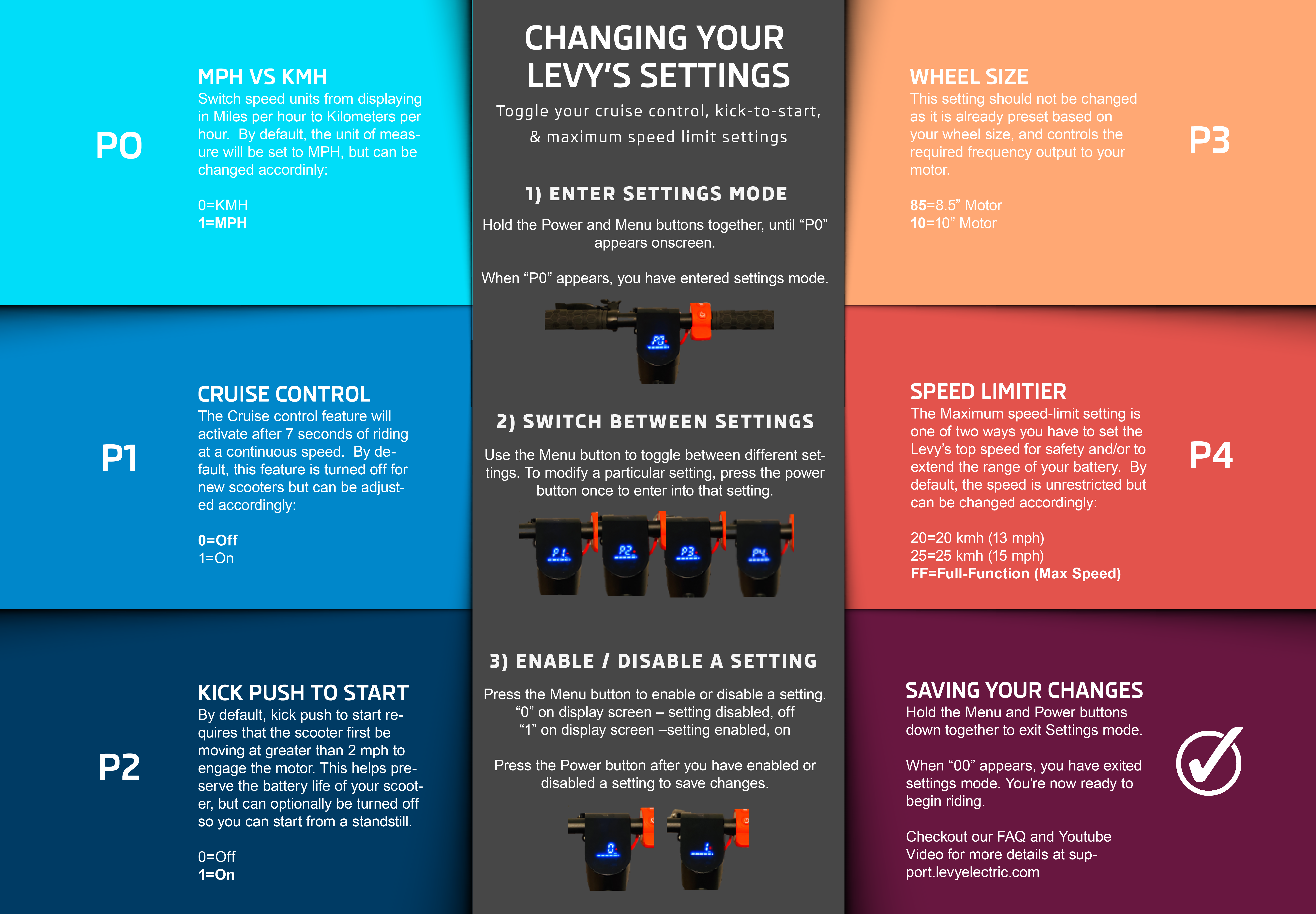
How to Change Any Setting
- Turn the scooter on.
- Press and hold Power and Menu at the same time.
- Release when
P0appears on the display. You are now in settings mode. - Press Menu to move through the settings:
P0,P1,P2,P3, andP4. - When the setting you want appears, press Power to open it.
- Press Menu to change the value.
- Press Power to confirm the value and return to the
Psetting list. - When you are finished, press Power and Menu at the same time to exit settings mode.
Common Changes
Change Between km/h and mph
Go to P0, press Power, choose 1 for mph or 0 for km/h, then press Power to save.
Turn Cruise Control On or Off
Go to P1, press Power, choose 1 to turn cruise control on or 0 to turn it off, then press Power to save.
Turn Kick-Push Start On or Off
Go to P2, press Power, choose 1 to require a kick-push before throttle engagement or 0 to disable the kick-push start requirement, then press Power to save.
Change the Maximum Speed Limit
Go to P4, press Power, choose FF for full speed, 25 for about 15 mph, or 20 for about 13 mph, then press Power to save.
Important Notes
- Do not change
P3. It is preset for the scooter controller and wheel size. - Top speed can vary based on rider weight, battery charge, tire pressure, road surface, and hills.
- Speed modes are separate from the
P4maximum speed limit. A scooter can still feel slower if it is in Beginner or Eco mode. - If a value does not save, re-enter the setting, choose the value again, and press Power before exiting settings mode.
Troubleshooting
| Issue | What to do |
|---|---|
| The menu does not open | Make sure the scooter is on, then hold Power and Menu together until P0 appears. |
| The setting changes back | Press Power after selecting the value. This confirms the change. |
| The scooter is still slower than expected | Check the current speed mode, battery level, tire pressure, and whether P4 is set below FF. |
| The display looks different | Use the Levy user manual for model-specific controls, or contact support before changing unknown settings. |
Related Guides
- User Manual - Levy and Levy Plus manual downloads.
- Changing the speed mode - Beginner, Eco, and Sport mode controls.
- Controlling the Levy speed-limit settings - extra context on speed limits and modes.
Was this article helpful?
Related Articles
Adjusting the rear brake
Occasionally the rear brake will need to be adjusted, either when your scooter first arrives or over time as the brake pads start to wear.
Levy Max Wiring Diagram
OLD J41 J16 J15 J14 HIGO CONN J13 OMNI CONN J12 OMNI IOT ASI CONTROLLER Pin Color Signal Pin Color Signal Pin Color Signal Pin Color Signal...
Brake Pad and Caliper Replacement
Estimated Time to Complete: 15 minutes Tools Required: 5mm wrench Parts Required: New brake pads: Purchase here Caliper: Purchase here (Optional if...