








How do I disable the "kick push to start" mechanism
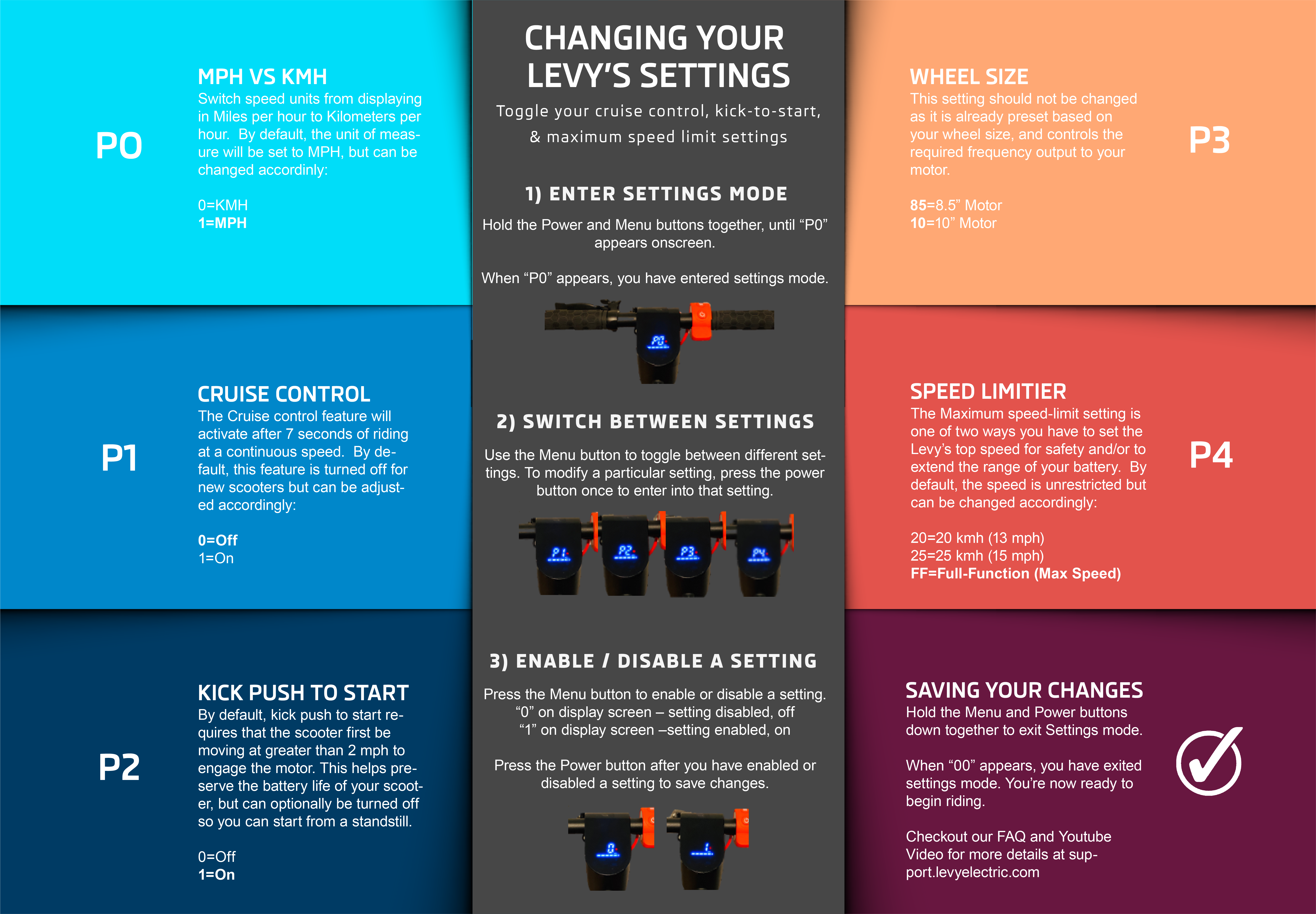
Kick Push to Start Setting Key: P2
On = 1
Off = 0
1) With the scooter turned on, hold down the Menu & Power buttons at the same time.
2) Press the menu button until the P2 setting is displayed.
3) Press the Power button to edit settings
4) Toggle to "0" using the Menu button to turn the setting off. Toggle to "1" to turn it back on.
5) Press the Menu & Power buttons at the same time to exit set up mode.
* Please note that disabling this feature can reduce the battery life / range on your scooter since starting from a standstill requires extra power consumption.
Was this article helpful?
Related Articles
How do you turn the headlights and tail lights on /off?
Yes, our scooters are equipped with headlights and tail lights that must be turned on after sunset.
What happens if I need to park during my trip?
If you need to temporarily pause your ride, you can use the Levy app to lock the vehicle.
Protocols for Incident Response and Safety Management
Introduction This protocol outlines the procedures for responding to incidents and managing safety risks associated with our electric scooter rental...